ترميم صورة قديمة
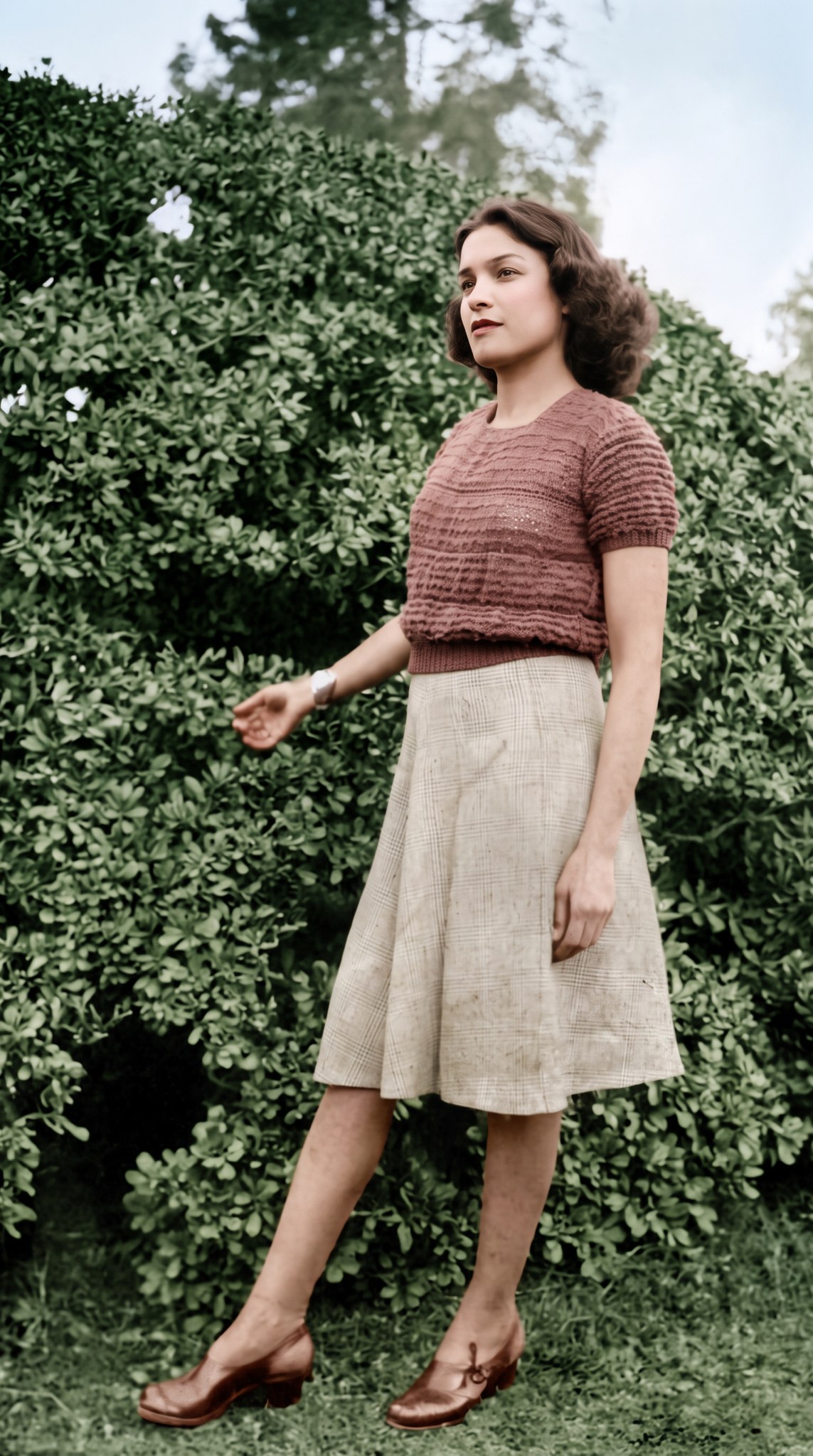
صورة مصرية قديمة من الأربعينيات بالأبيض والأسود، رمّمتُها ولوّنتُها بألوان زمنها، مع الإبقاء على الوجه والوقفة والملابس والخلفية كما هي.
نُشر في
- الأداة
- Nano Banana Pro
- المقاس
- 9:16 طولي
- الجودة
- 2K
- ما تحتاجه
- صورة قديمة تريد ترميمها
البرومبت
Act as a professional photo restoration expert. Restore and colourise the attached old black-and-white photograph, taken in Egypt in the 1940s.
The result must be the same photograph, as if the original print had been perfectly preserved and printed in colour at the time: the same person, face, pose, clothing, framing and background. Do not add, remove, move or reshape anything, and keep the full original framing. The only new element is colour.

SURFACE REPAIR
- Remove scratches, dust, stains, creases, fingerprints and moisture marks.
- Pay extra attention to: a pale faded patch in the top-right corner, white specks in the bushes, small dark marks on the skirt, and the soft, low-contrast look of the whole print.
- Rebuild small missing or torn areas from the surrounding details, keeping the fine texture of photographic paper.

STRUCTURE AND TONE
- Correct only slight tilt or lens distortion; never crop or recompose.
- Recover the original contrast without blowing out highlights or crushing shadows.

FACES
- Recover facial features with precision while keeping the person's real identity, age and expression.
- No wax skin and no beauty filter; keep natural skin texture and the original micro-expressions.

HISTORICAL COLOUR
- Realistic colours true to Egypt in the 1940s, in the soft, warm, slightly faded palette of colour film prints from that period.
- Colours I know and want kept: dark brown hair, a dusty-rose knitted short-sleeved top, a light beige checked skirt, dark brown leather shoes, deep green garden shrubs. Choose natural, period-appropriate colours for everything else.
- Natural skin tones that suit the person and the light of the scene, never uniform digital saturation.
- Keep a fine, organic film grain.

AVOID
- Modern or Instagram-style filters, plastic or airbrushed skin, neon or oversaturated colours, sharpening halos, a digital-painting or 3D look.
- New jewellery, makeup, text, logos, watermarks or photo frames.

OUTPUT: a photorealistic, museum-quality restored colour print with fine detail and faithful historical colour.
خصّصه لفكرتك
اكتب القيم بالإنجليزية، لأن البرومبت مكتوب بها. يتغيّر البرومبت وأنت تكتب.
اكتب البلد والعقد بالإنجليزية، مثل Syria in the 1960s أو Alexandria in the 1950s
صف بالإنجليزية ما تراه في صورتك، مثل a crease across the middle أو a torn bottom-left corner
اكتب بالإنجليزية ما تعرفه من ألوان الملابس والمكان، أو اكتب nothing specific ليختار الموديل
طريقة الاستخدام
- إن كانت صورتك ورقية، فصوّرها أو امسحها ضوئيًا في إضاءة متساوية بلا انعكاسات.
- عدّل الخانات في «خصّصه لفكرتك» لتصف زمن صورتك وتلفها وما تعرفه من ألوانها، ثم انسخ البرومبت.
- افتح Nano Banana Pro في المنصة التي تستخدمها، وأرفق صورتك القديمة مرجعًا، واختر أقرب مقاس إلى شكلها والجودة 2K.
- الصق البرومبت وابدأ التوليد، ثم قارن الوجوه بصورتك القديمة قبل أن تحفظ النتيجة.
ملاحظات من تجربتي
- جرّبتُه على صورة مصرية من الأربعينيات دقّتها 530×882 فقط، وطلبتُ صورتين في محاولة واحدة، فخرجتا سليمتين من أول مرة بالوجه والتسريحة والوقفة والملابس نفسها، وحلّت سماء فاتحة محلّ البقعة الباهتة أعلى اليمين.
- اخترتُ الأولى لنظافة ألوانها. وإن أردت ألوانًا أهدأ وأقرب إلى صور ذلك الزمن، فجرّب أن تكتب في خانة ألوان تعرفها muted olive-green shrubs بدل deep green garden shrubs.
- اختر في الأداة أقرب مقاس متاح إلى شكل صورتك القديمة، حتى لا يضطر الموديل إلى إضافة أجزاء جديدة إلى الإطار؛ اخترتُ 9:16 لأن صورتي طولية.
برومبتات شبهها
القاهرة
ميدان في ثلاثة عصور

ذكريات قديمة
ستايلك في الثمانينات
الجيزة
أنت مهندس الهرم

من صورتك
صورة بروفايل احترافية