
The Claude Max plan changed names on 30 October 2026: Max 5x is now just Max at $100 a month, and Max 20x is now the Ultra plan at $200 a month.
Prices did not move, and current subscribers don’t have to do anything, because accounts switch over on their own.
The one real change is on the Ultra plan, where the 5-hour limit is removed for verified accounts while the weekly limit stays at 10x Pro.
To subscribe, open claude.ai/upgrade and pick Max or the Ultra plan. Every figure below was read on 30 October 2026 from Anthropic’s pricing page and help pages.
What changed in Claude’s Max plans on 30 October?
Anthropic announced the rename from its official Claude account on X at 17:29 UTC. In it, Max 5x becomes Max, Max 20x becomes the Ultra plan, and the prices stay at $100 and $200 a month. Subscribers have nothing to do. The same post says the 5-hour limit is being removed for verified Ultra plan accounts, starting that day with most existing subscribers, and that weekly limits remain unchanged.
The reason for the new name came from the product lead for Claude subscriptions, who posted on X at 17:31 UTC. When the top plan launched in April 2025 it had a single limit, the 5-hour one, and that limit was 20x Pro’s, so it was called Max 20x. Weekly limits came later and were set at 10x Pro’s, while the 5-hour limit stayed at 20x. Some new subscribers took the 20x to cover both limits, and the post apologises for that and says Anthropic could have done better.
| Old name | New name | Monthly price | 5-hour limit | Weekly limit |
|---|---|---|---|---|
| Max 5x | Max | $100 | 5x Pro | 5x Pro |
| Max 20x | Ultra | $200 | None for verified accounts | 10x Pro |
The table comes from the pricing page and the help articles for Max and the Ultra plan. Max keeps both limits at 5x Pro. The Ultra plan keeps the weekly 10x it already had and loses the 5-hour limit, which used to sit at 20x. The words “for verified accounts” matter, because an account that isn’t verified yet still runs with a temporary limit.
Which accounts are verified on the Ultra plan, and how do you check yours?
Anthropic’s help page for the Ultra plan says the company verifies accounts on the plan automatically, using factors such as your account and payment history, to prevent fraud and abuse. Until then a temporary limit applies. It is lifted automatically, and the announcement says you will get an email when it happens. There is no button to press and no form to fill in.
One mix-up is easy to make: the phone-number verification you may see at checkout is not this verification. The help page calls it a separate step that does not remove the limit.
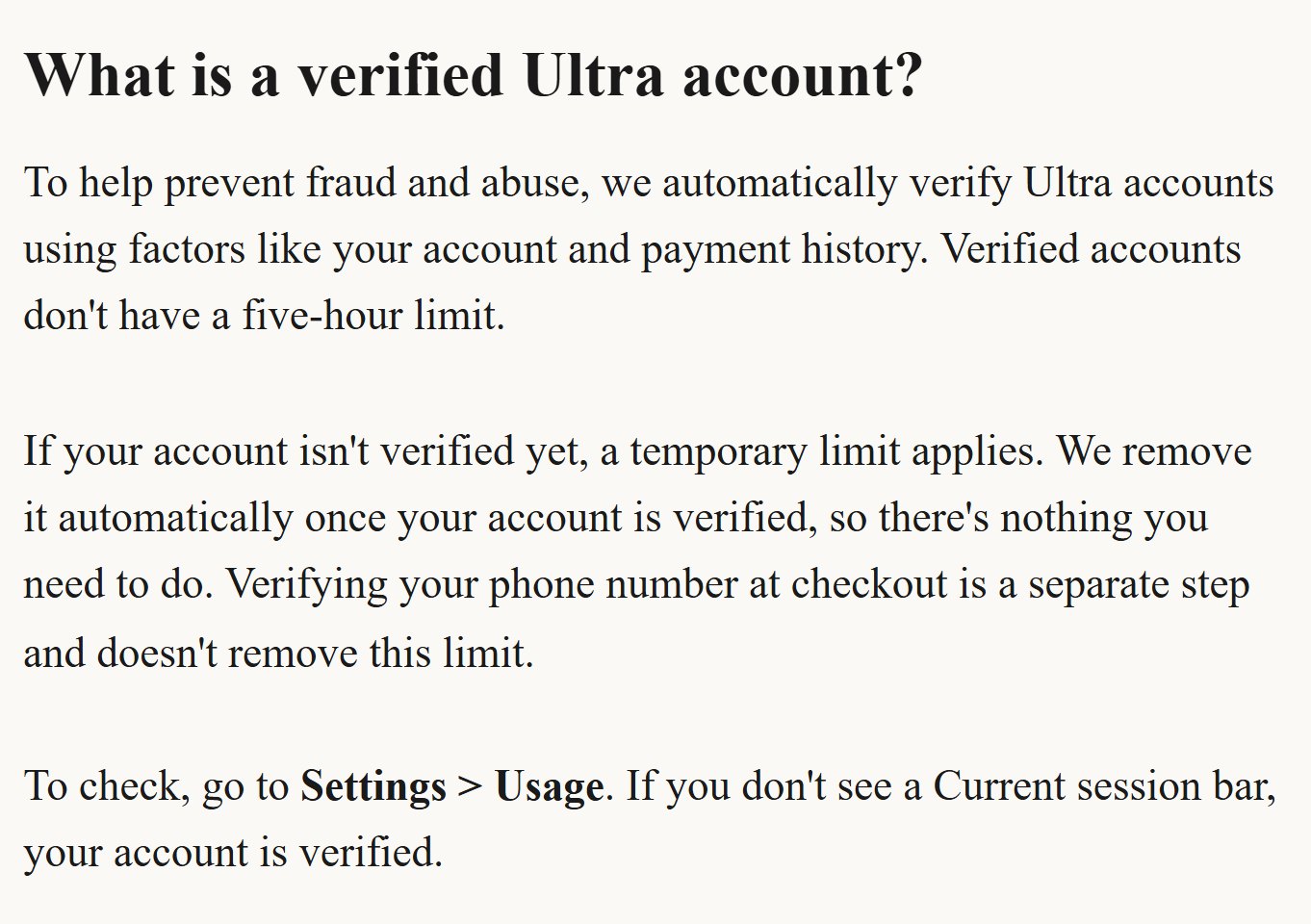
To check where you stand, open Settings > Usage on claude.ai. If you don’t see a Current session bar, your account is verified and the 5-hour limit doesn’t apply to you. If the bar is there, the temporary limit is still on. That bar is the only sign the help page names, and I would trust it over any guess.
I can’t tell you when your own account will be verified, and Anthropic hasn’t said. The rollout happens in stages, most existing subscribers come first, and newer accounts keep the temporary limit until they are verified.
Claude Max plan price and what the Ultra plan really adds
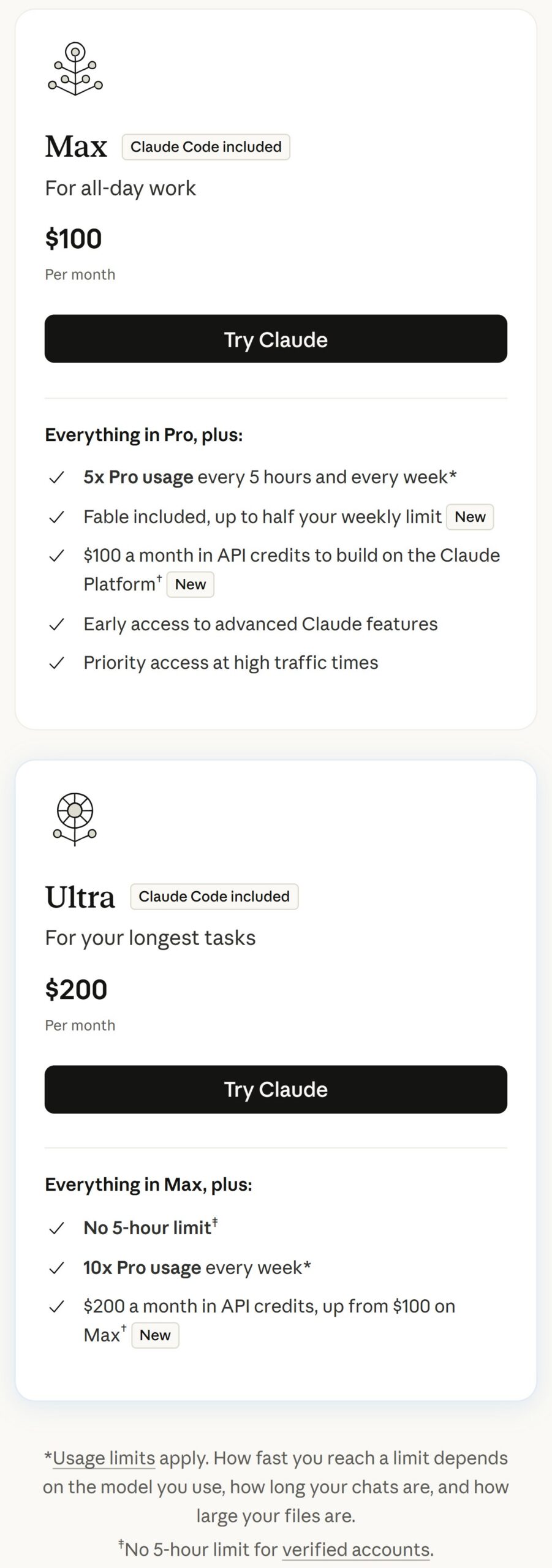
These are the numbers on Anthropic’s pricing page, with Pro priced on monthly billing.
| Pro | Max | Ultra | |
|---|---|---|---|
| Monthly price | $20 | $100 | $200 |
| 5-hour limit | 1x | 5x | None for verified accounts |
| Weekly limit | 1x | 5x | 10x |
| Fable | Usage credits | Included, up to half your weekly limit | Included, up to half your weekly limit |
| Monthly API credits | None | $100 | $200 |
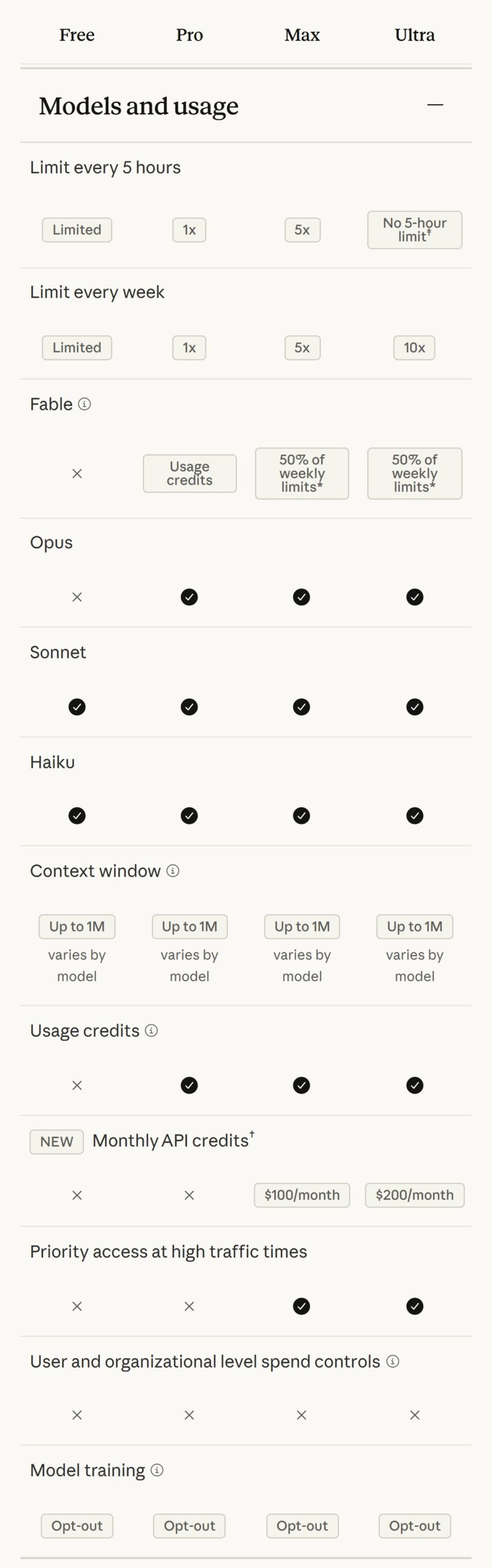
Pro drops to $17 a month on annual billing ($200 billed up front), while Max and the Ultra plan are monthly only. All three include Claude Code, and Claude on the web, desktop and mobile draws from the same pool as Claude Code, so a long chat uses the same allowance as a coding session. Max and the Ultra plan add priority access at high-traffic times. Each has one weekly limit across all models and a separate weekly limit for Fable, so you can run out of one while the other still has room.
Now my own arithmetic, not Anthropic’s. Divide each price by its weekly multiple and you get $20 per 1x on all three plans: Pro at $20 for 1x, Max at $100 for 5x, the Ultra plan at $200 for 10x. So the Ultra plan is not a cheaper rate per unit of weekly allowance. It gives you twice Max’s weekly ceiling for twice the price. What differs on top of that is the missing 5-hour limit for verified accounts and $200 of monthly API credits instead of $100.
Fable 5 and Fable 5.1 are a standard part of Max and the Ultra plan, at no extra cost, up to half of your weekly limits. They draw from the same weekly limits and use them faster than other models. Past that half you either switch on usage credits or switch model. On Pro they run on pay-as-you-go usage credits instead. In Claude Code you need version 2.1.170 or later for Fable 5 and 2.1.255 or later for Fable 5.1.
How do you subscribe to Max or the Ultra plan?
The route the help pages describe is the browser.
1. Open claude.ai/upgrade and sign in with your Claude account. To read the plans first, claude.com/pricing lists them with their upgrade buttons.
2. Choose the Max card at $100 or the Ultra plan card at $200.
3. Pay by credit card. Both plans are monthly only.
4. Afterwards, open Settings > Usage to see your limits and when your weekly limit resets. Each account gets a fixed weekly reset time, and the next one is shown there.
The $100 and $200 figures are the web price. The help page for the Ultra plan says mobile pricing may vary by app platform. Anthropic has no standard discount on individual plans, though it occasionally announces promotions on its official channels.
Moving from another plan has its own rules. On annual Pro, if the balance left is greater than the Ultra plan’s price, you get a credit for it, applied to future costs, provided your billing address matches your previous subscription’s. From Max to the Ultra plan you are charged on a prorated basis for the rest of your billing cycle. Through Google Play you pay the full price and the unused value of your old plan becomes extra days.
Where do you use it once you have paid?
The simplest place is Claude Desktop. Download it, sign in with the same account and open the Code tab. The help page says Desktop includes Claude Code, so nothing else needs installing. If you prefer the terminal, the Claude Code quickstart covers it, and you sign in with the same Claude credentials.
Watch for one trap. If an ANTHROPIC_API_KEY environment variable is set on your machine, Claude Code bills the API instead of your subscription, so you pay per token while the plan sits unused. Check for it before your first session.
The help pages I read don’t describe an upgrade path from inside the Desktop app, so I am not claiming there is one. Upgrade in the browser.
What are the monthly API credits, and how do you claim them?
Max includes $100 a month in API credits on the Claude Platform, and the Ultra plan includes $200. Free, Pro and Enterprise are not eligible. This is where I expect a misunderstanding: “$100 in credits” sounds like it stretches your limits in chat or in Claude Code, and it doesn’t. The credits are separate from your plan limits and exist for building your own apps and agents on the API.
They cover the Claude API (the Messages API and Batches), the Console Playground, Claude Managed Agents and the Claude Agent SDK. They don’t cover interactive Claude Code, whether in the terminal, an IDE, the desktop app or the web. They don’t cover extra usage in Claude, Claude Code and Cowork either, nor Claude on Amazon Bedrock, Google Cloud Vertex AI or Microsoft Foundry.
How do you claim the credits?
You need seven days on an eligible plan first. After that, open claude.ai in a web browser, because the help page says claiming happens there, and go to Settings > Billing. In the API credits section, click Link organization. Choose an existing Claude Console organization or create one, and accept the Supplemental Credit Terms. You don’t have to add a card on the Claude Platform to claim or use the credits. You do need the Owner, Admin or Billing role in that organization.
Think before you click: only one Console organization can be linked, and changing it later means contacting support, so pick the one where you will really build.
The credits refresh every billing cycle and don’t roll over. They are spent before any credits you purchased yourself. If they run out and the organization has no purchased credits, API requests stop until the next cycle’s credits arrive. If you move from Max to the Ultra plan after claiming, you receive prorated credits right away and then $200 each cycle. Anthropic says the offer is rolling out over a few days, so it may not appear in your account yet.
Which plan should you pick, and what hasn’t Anthropic said yet?
I don’t have an account to test the Ultra plan on today, so this is a reading of the official numbers, not a test result. It leads to four cases.
If you only rarely reach Pro’s limits, stay on Pro. A unit of weekly allowance costs the same on all three plans at monthly billing, so upgrading saves you nothing.
If what stops you is the 5-hour limit in the middle of a long session, that is exactly what the Ultra plan removes, as long as your account is verified. Max leaves the 5-hour limit at 5x Pro.
If your wall is the weekly limit, the Claude Max plan gives you 5x Pro and the Ultra plan 10x. On any paid plan you can also turn on usage credits to keep working past a limit at standard API rates, which suits someone who hits the ceiling now and then and doesn’t want to raise the whole subscription.
The fourth case is a limit reset. If your account has one, you will find it in Settings > Usage in the Resets section, and Reset for free puts your weekly limits back to full. It isn’t available in the Claude mobile app or in Claude Code in the terminal or an IDE, so use the browser or Claude Desktop.
If you want help deciding which plan suits your work before you pay, or setting up Claude and Claude Code around the way you work, you can book a full hour with me, deducted from any project we build together.
What Anthropic hasn’t said yet
Anthropic hasn’t said when newer accounts will be reached, and it doesn’t promise uninterrupted service on the Ultra plan: the help page says additional usage limits may apply to manage capacity and that Anthropic doesn’t guarantee uninterrupted service.
Expect to see both names on screen for a while. As I write this, the help page for using Claude Code with Pro or Max still says Max 5x and Max 20x in its limits section, and the upgrade button for the Ultra plan on the pricing page still carries plan=max_20x in its URL. That is the old name lingering, not a mistake on your side.
I left Team and Enterprise out, so this covers the individual plans. I read every price on 30 October 2026 only, and Anthropic can change them. I haven’t tried either plan on an account of my own, so what I wrote about verification comes from the help page, not from experience.