An Arabic AI presentation maker usually gets the words right and the file wrong. The Arabic itself is correct, but every paragraph is still stored as left-to-right, so bullets land on the wrong side, table columns keep their English order, and the font you picked may only apply to Latin letters.
I built the same four-slide Arabic deck twice with python-pptx, once with default settings and once with every direction and font property set by hand, then opened the XML and exported both through PowerPoint to images and PDF.
These faults live in how the PPTX format stores direction and fonts, so any tool that exports a PPTX can run into them. I only tested python-pptx, and only in PowerPoint on a Windows PC.
What does an Arabic AI presentation maker get wrong?
python-pptx is a common way for code to build a deck, so I used it as a stand-in for what a generator produces. I wrote the script the way an assistant writes it when nobody mentions Arabic: a title slide, an agenda with four lines, a table of three columns, and a closing slide, with Arabic text typed straight into the paragraphs and no direction settings at all.
Then I unzipped the file. A PPTX is a ZIP archive of XML files, and each paragraph in a slide can carry an rtl attribute that tells PowerPoint to lay it out from the right. The default deck had 21 paragraphs and none of them carried it. It also had no complex-script font element anywhere, which matters later in this article.
On screen the damage was easy to see. Every line hugged the left edge of the slide, and the bullet character, which I typed as part of the text, sat on the left of each line. The words read correctly from right to left inside each line, but the whole block started at the far left of a slide meant for a right-to-left reader.
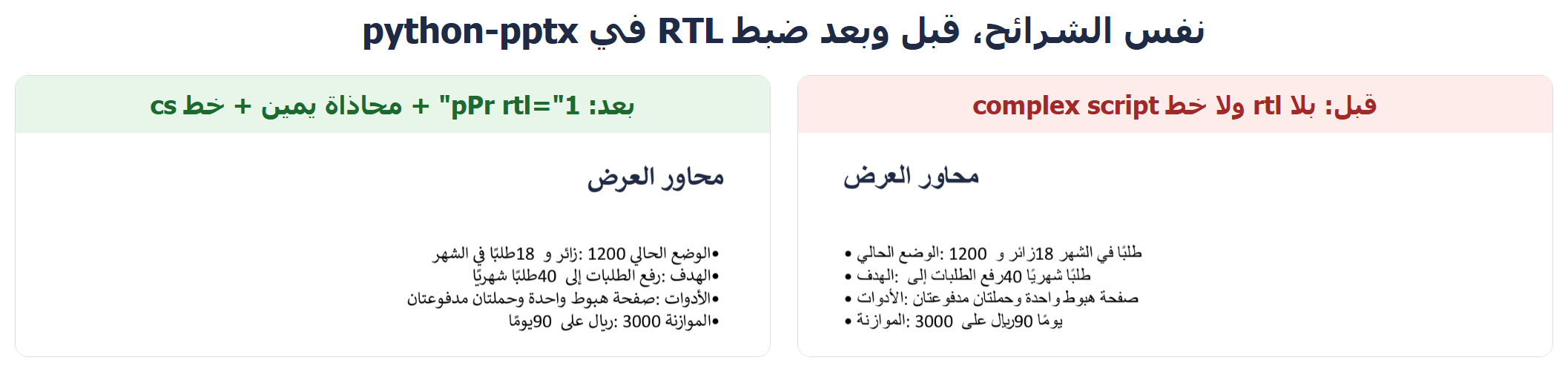
The fix was two lines of code per paragraph, not a rewrite of the deck.
How do you fix text direction in python-pptx?
The library has no ready-made rtl property. The highest-level control it gives you is paragraph alignment, and that alone is not enough, so I reached into the paragraph’s XML and set the attribute myself:
from pptx.enum.text import PP_ALIGN

paragraph.alignment = PP_ALIGN.RIGHT
pPr = paragraph._p.get_or_add_pPr()
pPr.set("rtl", "1")
I also tried each line on its own to see what it does. Right alignment without rtl moved the text but left the bullet on the left. The rtl attribute without right alignment left the text pressed against the left edge of its box. The full fix needs both, on every paragraph, including titles and the paragraphs inside table cells. In the fixed deck all 21 of 21 paragraphs carried the attribute.
I did not put an English heading above an Arabic body in the same line. Mixed-direction text has its own ordering rules, and my test says nothing about it.
Why does the Arabic font look different from the one you picked?
One piece of text in a PPTX can carry three font settings: a:latin for Latin letters, a:ea for East Asian text, and a:cs for complex scripts, which is where Arabic belongs. When you set a name with run.font.name, python-pptx writes it into a:latin only. I checked the XML: the name appeared in a:latin, and a:cs was absent from the whole default deck.
So if you pick a font that has no Arabic letters, or you pick one for the Latin text and expect it to cover everything, the Arabic is drawn with whatever the theme names as its complex-script font. That can be a different face from the one you chose, and the gap shows where Arabic words sit next to digits or Latin names on the same line. I added the missing element by hand with the same typeface name:
from lxml import etree

rPr = run._r.get_or_add_rPr()
cs = etree.SubElement(
    rPr, "{http://schemas.openxmlformats.org/drawingml/2006/main}cs"
)
cs.set("typeface", "Calibri")
With that in place, the fixed deck showed every Arabic letter in Calibri, joined correctly. That only tells you about the machine I used, which has a Calibri build with Arabic support, not about every copy of Calibri on every computer.
Direction and font are separate problems and either can happen without the other. A direction fault pushes the whole block to the wrong side. A font fault leaves a visible mismatch inside the line.
Do tables flip to right-to-left too?
No, and this is the one that surprised me most. I made a table slide with three columns: indicator, current month, target. I set rtl and right alignment on the paragraph in every cell, exactly as for the agenda. The text inside each cell moved to the right, as expected. The column order did not change. “Indicator” stayed in the leftmost column and “Target” stayed on the far right, the same order the table was born with.
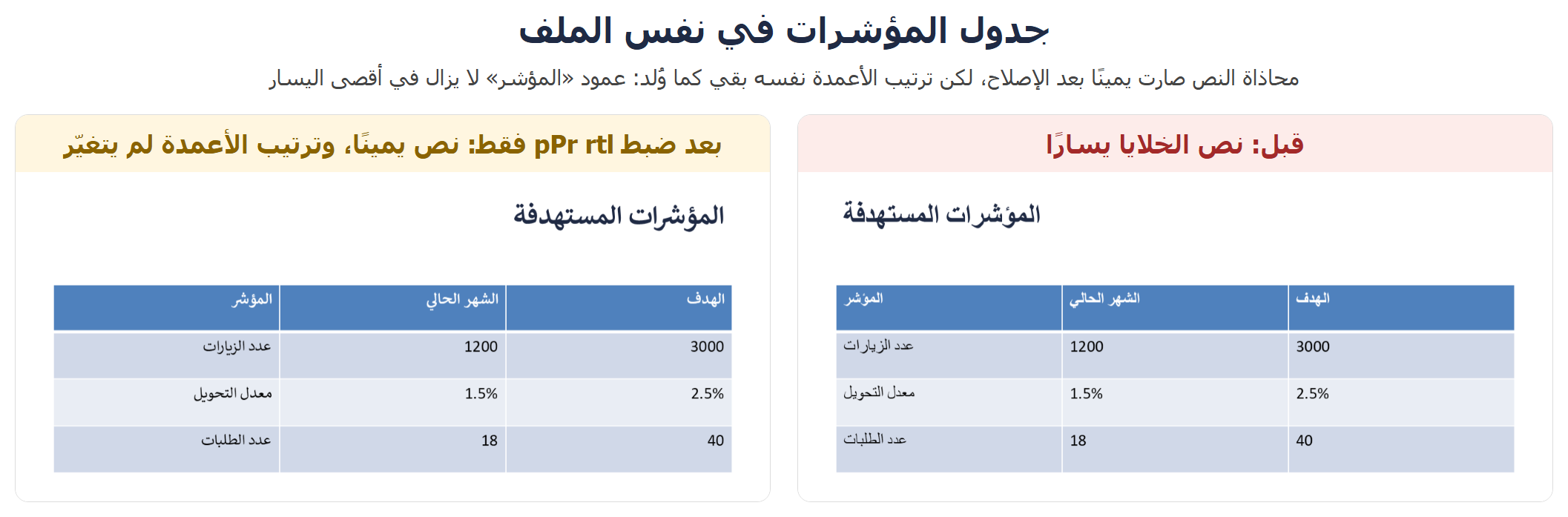
A table in a PPTX has no direction property of its own. Its columns are stored in a fixed physical order, and rtl only changes how text sits inside each cell. The only fix I found is to build the table with the columns in reverse order: if an Arabic reader expects “Indicator” on the far right, it has to be the last column your code adds. Most advice stops at “turn on rtl”, and for tables that leaves the layout half done.
How do you write Arabic numbers in PowerPoint?
This is one of the questions people type most, so I tested it directly. On every slide I wrote the digits as Western numerals: 1200, 18, 40, 3000. They came out exactly as typed, in the default deck and in the fixed one. python-pptx and PowerPoint did no conversion to Arabic-Indic digits like ١٢٠٠. I also typed one Arabic-Indic number into a paragraph that already held Western digits, and it stayed as typed, without being moved around the surrounding text.
So the choice between the two digit styles is yours, made when the text is written. Western digits are the usual choice in formal and technical Arabic documents, and Arabic-Indic digits are common in everyday print in some countries. Pick the style that matches your invoices, reports and website, and say so in the prompt if a tool is writing the slides. If you leave it open, expect Western digits, because most of what these tools learned from is English.
Why does the colon jump after the number?
After the direction, the font and the table were fixed, one defect remained on a plain line from the agenda slide. The source text was “Current status: 1200 visitors and 18 orders a month”, in Arabic, with the colon touching the word for “status”. On the slide, the colon appeared after 1200, so the line read as if the colon belonged to the number. PowerPoint’s own image export shows the same thing, so it is not an artifact of how I captured it.
I tried four versions of that one line on one slide, all with the fixed settings: the line as typed, the line with an invisible right-to-left mark (U+200F) placed right after the colon, the same mark before each number, and Arabic-Indic digits instead of Western ones.
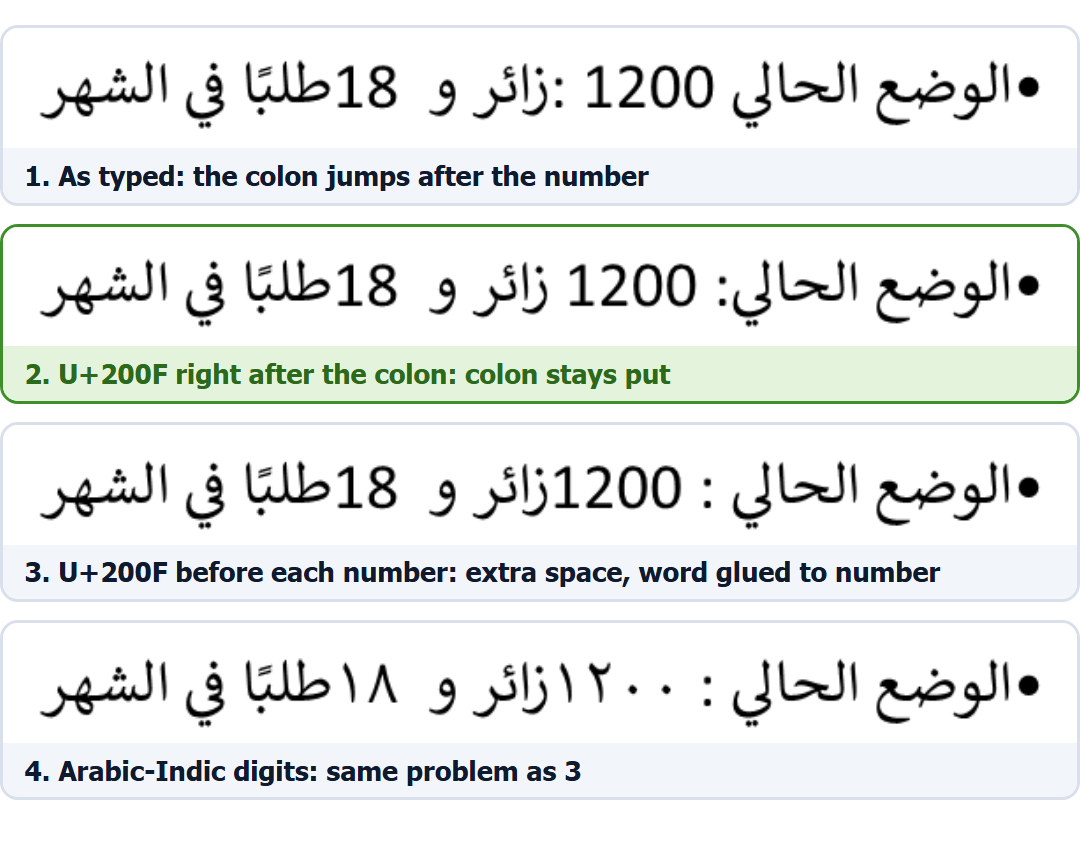
Only the second version put the colon back where it belongs. The third kept the colon in place but added a space before it and glued the next word to the number. The fourth, with Arabic-Indic digits, gave the same poor result as the third. Changing the digit style fixes nothing here; the position of the mark is what matters. Add it to the text before it reaches the slide:
LABEL_END = ":" + "" # colon, then the right-to-left mark
# the real deck holds this line in Arabic
text = "• Current status" + LABEL_END + " 1200 visitors and 18 orders"Even in the second version, the number 18 stayed stuck to the word after it, with no gap, although the text has a space there. Nothing I tried fixed that part. And again, this is PowerPoint on my PC. I can’t say whether Google Slides or Keynote treat the mark the same way.
Does the fix survive a PDF export?
I saved both decks as PDF from PowerPoint itself and read the second page, the agenda slide, with PyMuPDF, which reports where each word sits on the page. In the default deck, the first six words start between 6% and 19% of the page width, which is the left side. In the fixed deck they start between 76% and 92%, the right side. The direction fix is still there after the export.
The list of embedded fonts told me one more thing. The default deck’s PDF carries both Arial and Calibri, while the fixed deck’s PDF carries Calibri alone, which matches what I saw in the XML about the complex-script font. The colon problem also moved into the PDF exactly as it looked on screen. If you export before fixing it, you get a file with the same fault, so repair the slide first and export afterwards.
What if you use a web tool and can’t edit the code?
Everything above applies to the file, whatever made it. If you use a web-based Arabic AI presentation maker and download a PPTX, open each slide after the export and check four things, which takes about a minute: which side the text starts from, which side the bullets are on, the column order in any table, and whether the Arabic words and the digits on one line look like the same typeface.
I did not try the web-based deck generators themselves, since they need accounts and plans I haven’t opened. What I described holds for any file in the standard PPTX format, but I can’t tell you that every tool produces exactly these faults. I also did not test converting to Google Slides or Keynote, which may add their own direction problems.
If you would rather not repeat these steps by hand every time, the Arabic deck and doc output skill sets these four properties when it generates the file. For a deck that already exists and needs checking before you present it, the Arabic typography audit skill returns a list of faults ordered by severity.
Can I fix a finished PowerPoint file by hand without code?
Partly. Select all the text and right-align it from the Home tab, which covers part of the problem. I did not test the paragraph-direction button on a finished deck, so I can’t say whether it repairs the bullets and the table column order. If it doesn’t, the code above is the route I verified.